Thirteen features, every one of them shipping today. Where the app estimates something rather than measuring it, this page says so — which is the same thing the app does on the screen itself.
Today
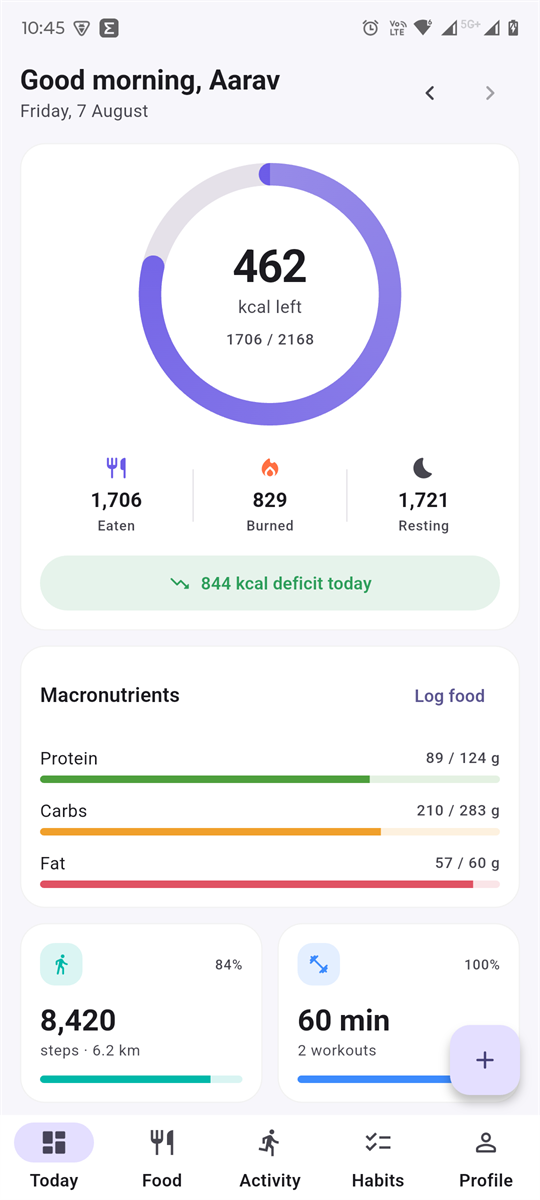
The calorie ring is a budget, not a score. It fills as you eat and turns red past your target, so being over is visible rather than hidden. Underneath, the day splits into the three numbers that explain the ring: what went in, what you burned moving, and what your body spent just being alive.
Eaten, burned and resting stay separate — Adding them together is how most trackers quietly double-count. Burned spells out both halves — “1,721 at rest + 240 active”.
Activity is costed net of resting energy — An hour’s run is charged (MET − 1), not MET, because the resting burn already covers that hour.
Macro targets scale with your bodyweight — Protein per kg, fat at 25% of calories, carbs take the remainder — not a fixed 40/30/30 split.
The whole dashboard is one call — Six endpoints would mean six round trips and six spinners on a mobile connection.
The ring reads as eaten over target; what is left keeps its place underneath.
Food diary
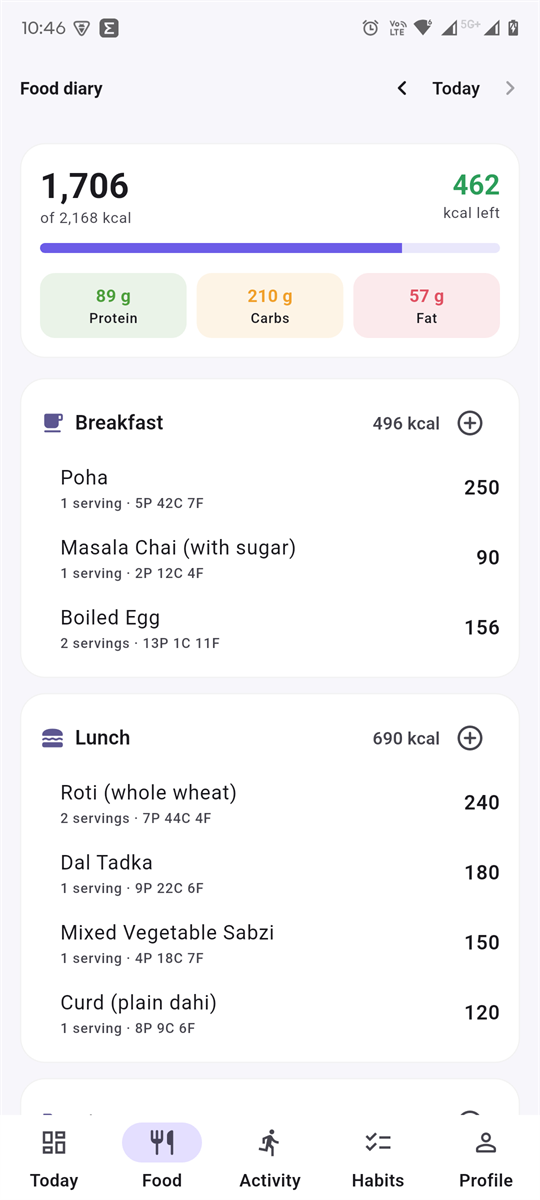
The catalogue ships with foods weighted towards how people here actually eat — roti, dal, poha, idli, paneer, masala chai — each with a real serving label like “1 roti (45 g)” rather than an abstract 100 g. Search it, add your own, or enter a one-off with a name and a calorie count. Seven meal slots, because that is how the day goes: bed tea, breakfast, something at eleven, lunch, evening snacks, dinner, milk after.
All five vitals, per day and per item — Protein, carbs, fat, fibre and sugar. A zero stays visible, because it is a measurement rather than a gap.
Frequent foods come first — Open the sheet with an empty search and it lists what you log most — a tracker is mostly the same twenty meals.
Nutrients are copied onto the log, not joined at read time — Correcting a catalogue entry must never silently rewrite what you ate last month.
Correct the amount after logging it — Change how much you actually ate; the entry rescales from its own figures and the day’s totals follow.
The diary is what you ate. What you intend to eat lives on the meal plan.
Photograph the plate
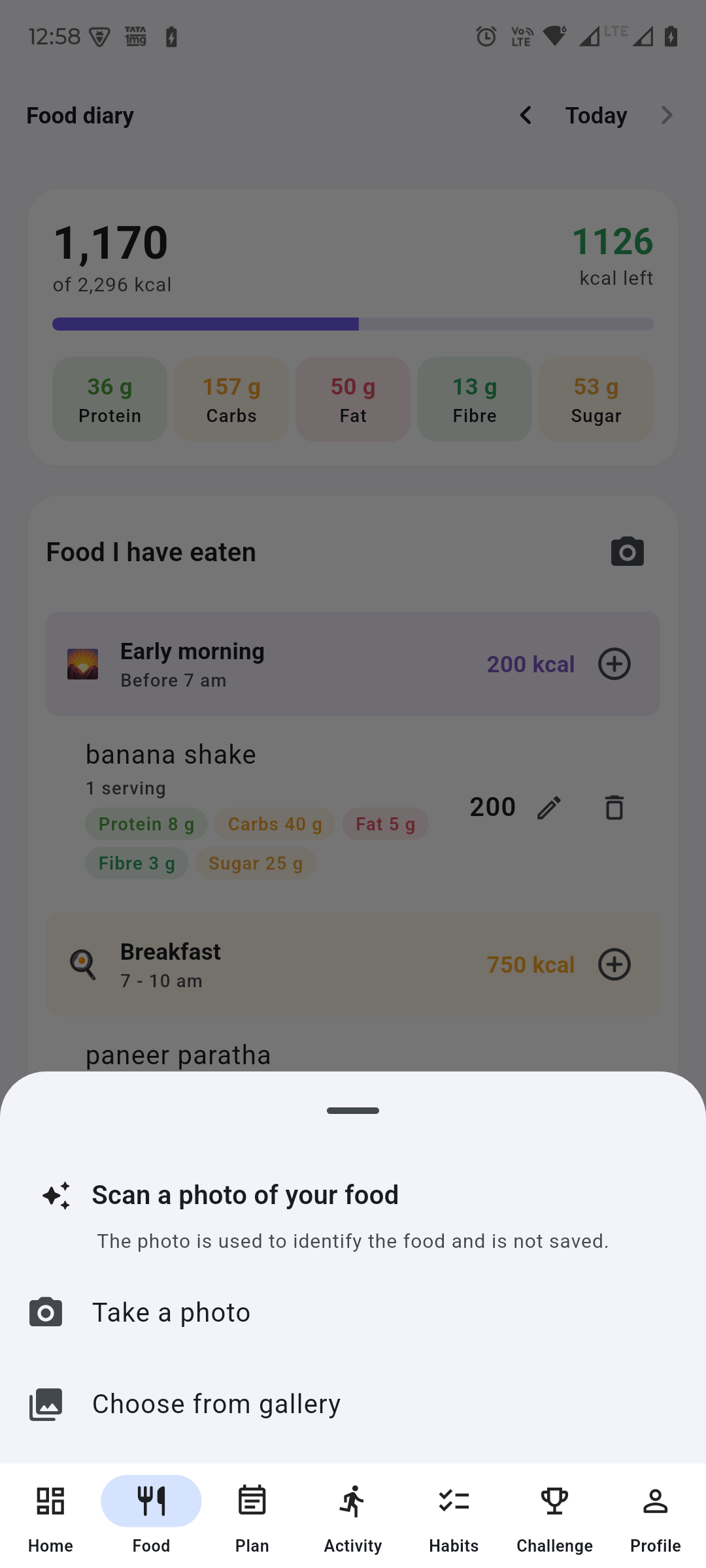
Tap the camera on the diary card, take a picture, and the dishes come back named with calories, protein, carbs, fat, fibre and sugar. Tick what is right and it goes into the diary. Fix the name or the portion first if the model got it roughly right and the amount wrong, which is the usual case.
The photo is never stored — Uploaded, read, and dropped when the request ends. No disk, no database, no object store — the scan is the point, not the picture.
Nothing lands in your diary unprompted — These are estimates from a photograph. Rows the model is unsure about say so in plain words rather than showing a confidence percentage.
The key lives on the server — An APK is a zip anybody can unpack, so a key shipped inside one is a key published. The phone uploads; the API calls out.
Optional, and it says the price before the tap — Two free scans a day, then credits — and a manual path that is always free.
The sheet says what happens to the photo before you hand one over.
Meal plan
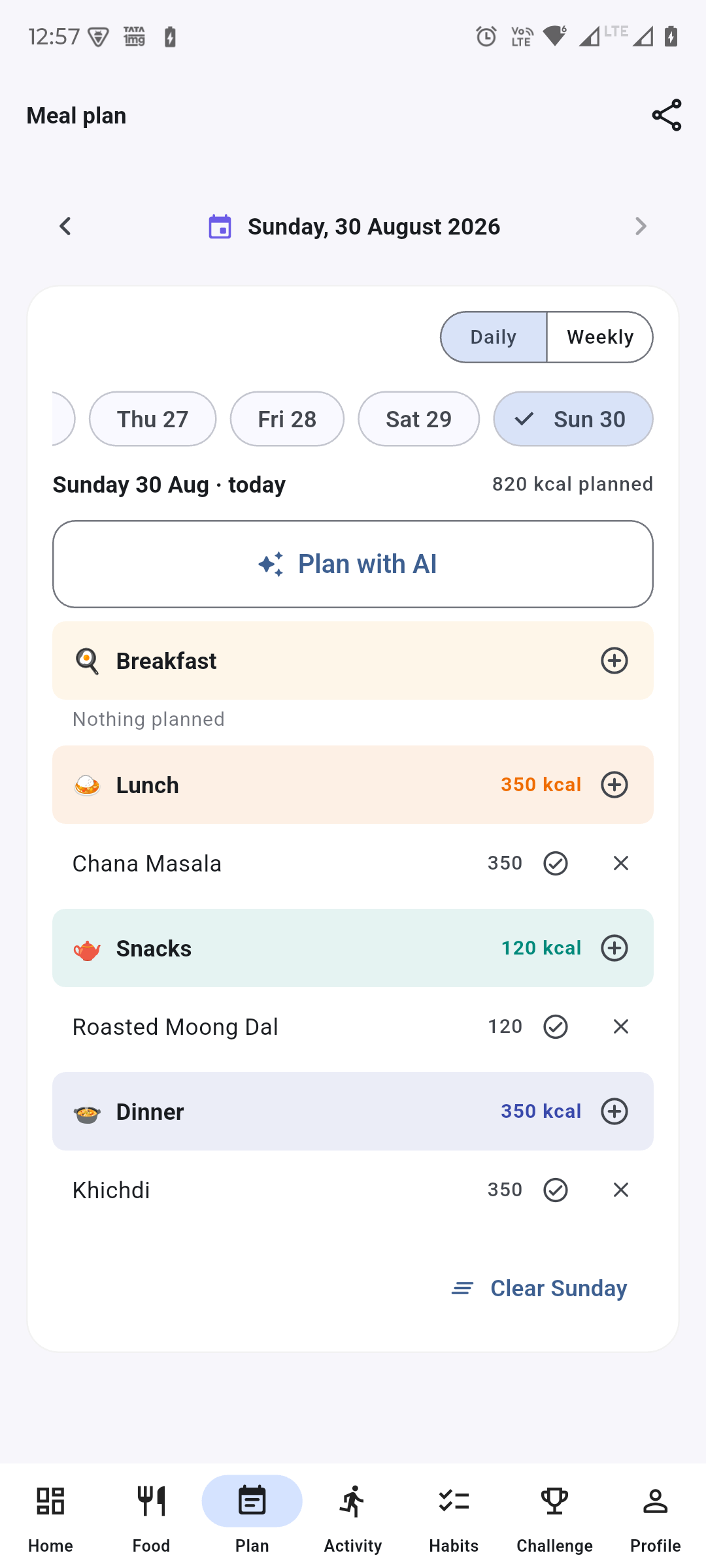
“Monday is poha” stays true until it is changed, so the plan itself carries no dates — but the week it is applied to does, and every day shows one. Daily shows a day, weekly shows all seven, and the whole thing shares to WhatsApp as plain text.
Plan with AI, sized against your own targets — Three options each for breakfast, lunch, snacks and dinner — against your calorie and protein targets, not a generic idea of healthy.
Only the meals still ahead of you — Planning at four in the afternoon offers snacks and dinner. An idea nobody can act on pushes the ones they can further down the screen.
It knows the season, and your kitchen — The month, the season and your food preferences go into the prompt; a forecast it cannot verify does not.
Four ways to ask again, per meal — Healthy, protein rich, fibre rich, or just next — and every ask names what you already turned down.
A day at a time or the whole week, with the date on every day.
Activity & Heart Points
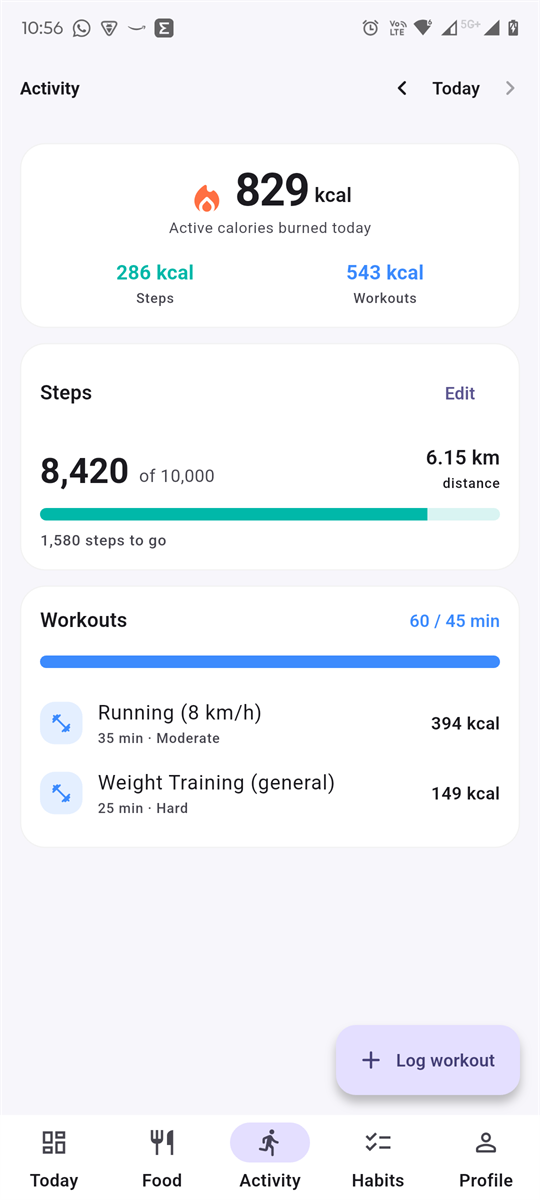
Steps come from the phone’s hardware pedometer and sync in the background, so the number is there without opening the app. Workouts are a two-step pick — the activity, then the duration and how hard it felt — and the burn is estimated from the activity’s MET value scaled by your weight. Heart Points follow the World Health Organization’s arithmetic: one point a minute of moderate movement, two a minute of vigorous, against 150 a week.
The picker previews the burn before you commit — “~183 kcal per 30 min”, computed from your weight rather than a generic table.
Step sync is idempotent — The pedometer reports a running daily total, so the app sends the total, never a delta. A retry cannot inflate it.
Measured and estimated are labelled as such — A logged workout has a duration; steps do not, and the app says which of your points came from which.
Wearable readings win — Send a figure from a watch and the app stores that instead of its own estimate.
The step card draws the shape of the day and names the busiest stretch in words.
Habits
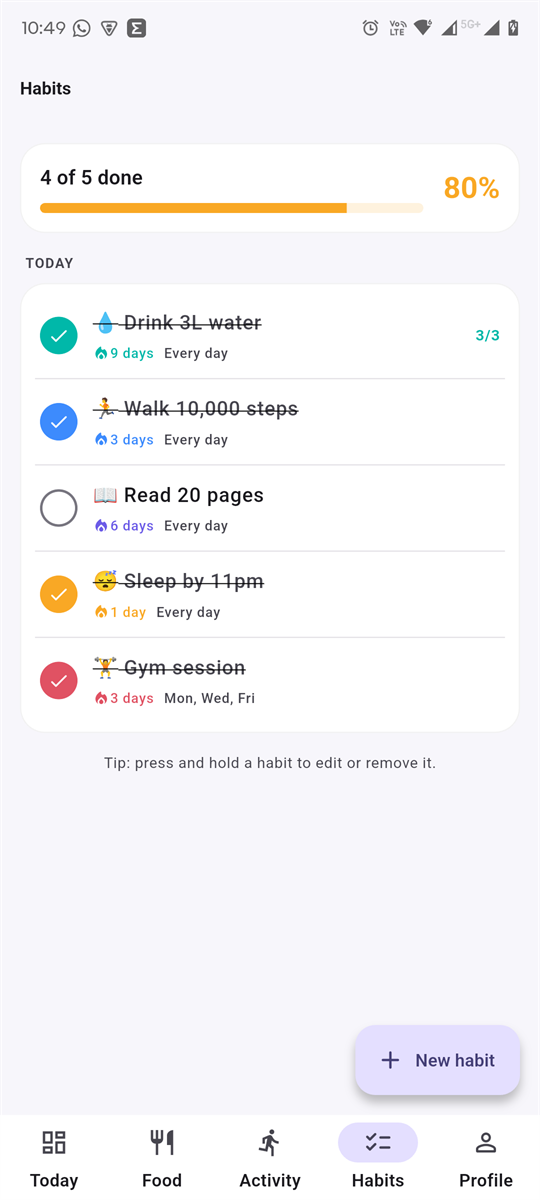
Calories fluctuate for reasons you cannot always explain. Habits are binary and yours. Build them, tick them off — the checkbox responds instantly and reconciles with the server afterwards, so it never feels like it is waiting on a network — and read the week or the month back as a grid.
An unfinished today does not break your streak — At 9am you have not failed yet, so a habit still shows its six days while unticked.
Unscheduled days are skipped, not counted as misses — Missing a Tuesday cannot reset a Mon/Wed/Fri habit.
Check-ins send an absolute count — Not an increment, so a double tap or a retried request cannot inflate the day.
The report marks four states, not three shades — A tick for done, a dot for part done, a cross for missed, and no box at all for not due.
Body
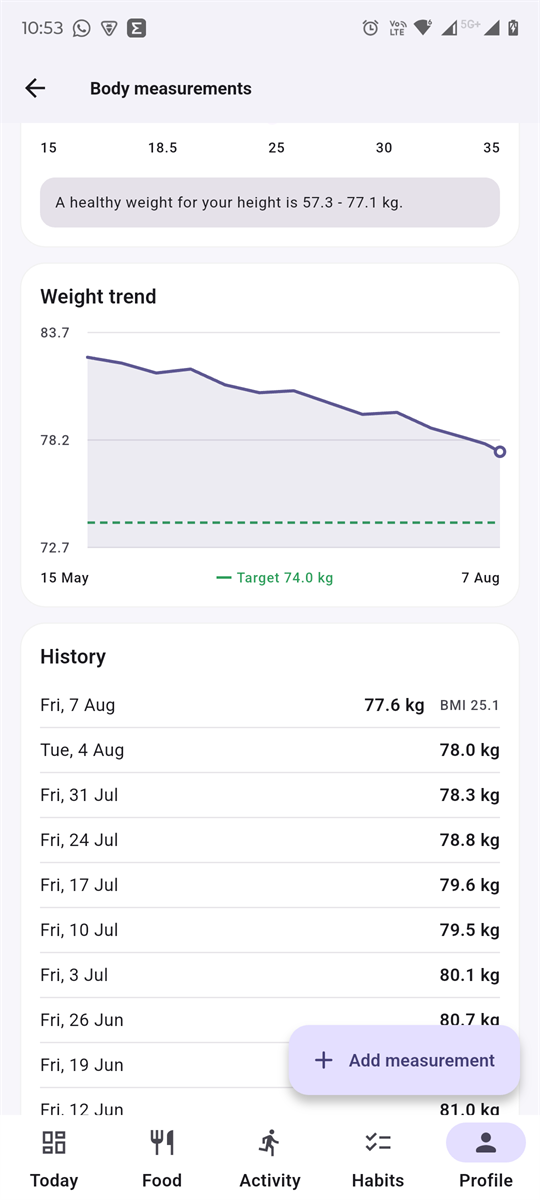
Record weight, height and body fat; the app derives BMI, classifies it, and works out the healthy weight range for your height. One measurement a day, upserted — re-weighing in the evening corrects today’s figure instead of adding a second point that makes the trend line zig-zag.
BMI is drawn on a scale, not printed as a number — “25.1” means nothing without knowing where the boundaries sit, so the bands and your position are both visible.
Your target is a dashed line on the chart — Which makes “am I closing the gap?” a glance rather than a calculation.
Weight feeds everything — Change it and BMR, calorie target, macro targets and every future workout estimate move with it.
One measurement a day, and the target drawn on the chart rather than stated beside it.
Goals & profile
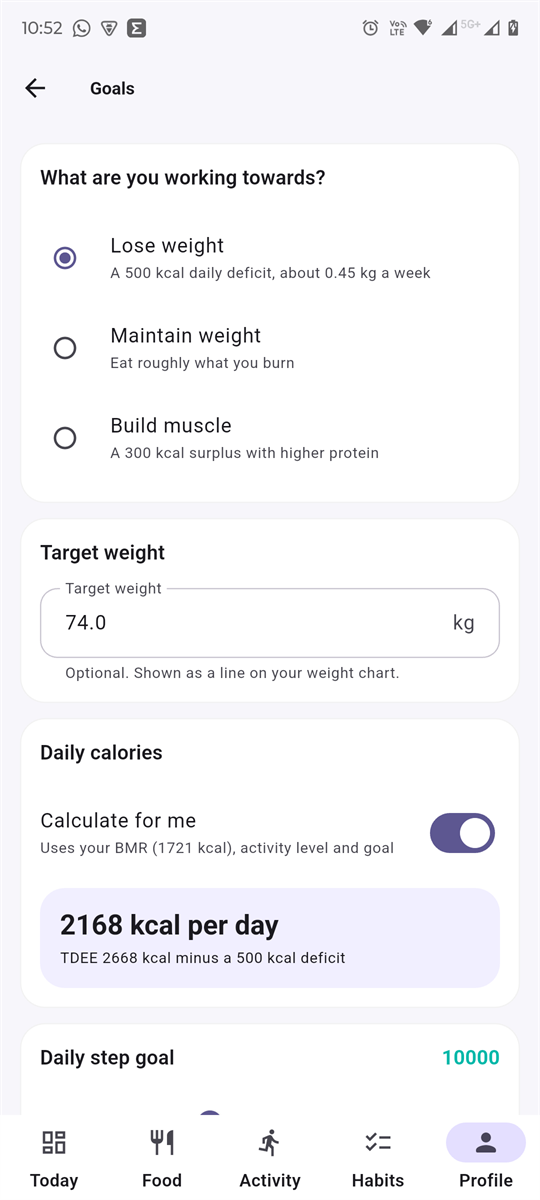
Pick what you are working towards and the app derives the numbers: BMR from Mifflin-St Jeor, TDEE from your activity level, then a deficit or surplus for your goal. Or switch “calculate for me” off and set the calorie target yourself. Either way the workings are on screen rather than hidden behind a single figure.
The derivation is visible — “TDEE 2,668 kcal minus a 500 kcal deficit” — the target is auditable instead of magic.
Goals carry their consequence — “Lose weight” says “about 0.45 kg a week”, so you can judge whether that is what you wanted.
Targets are floored at 1,200 kcal — An aggressive goal can never generate unsafe advice.
Two food preferences, read only by the meal suggester — What you will eat, and the kitchen you cook out of. Both start unanswered, and unanswered is a real state.
Challenges
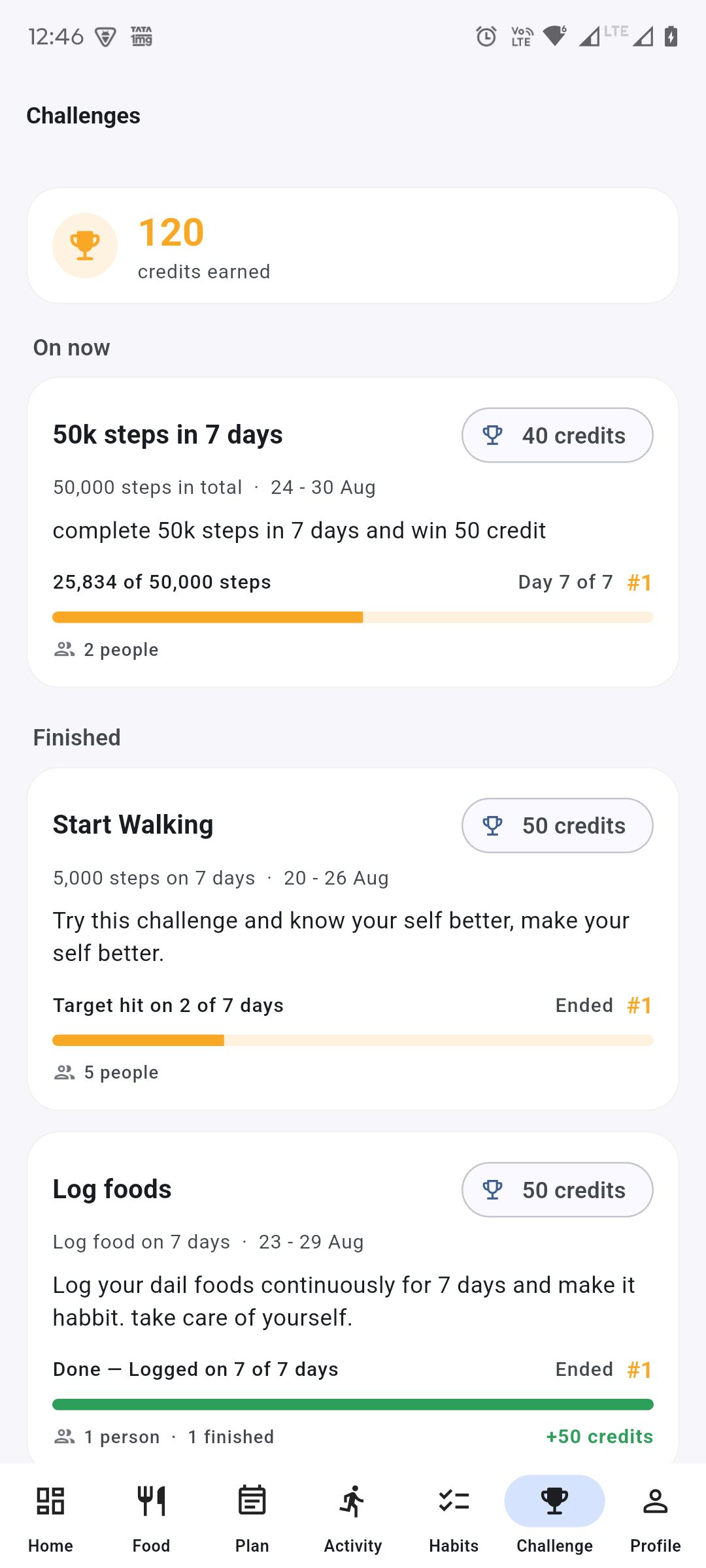
Every challenge is scored from what the app already records — steps, food logs, workouts — so there is nothing to self-report. Four kinds: so many steps every day, total steps, days you logged food, and total exercise minutes.
Joining is explicit — A board that ranked everybody would publish one person’s step count to somebody who never agreed to compete.
Achievement is a moment, and it is recorded — Scores are recomputed from your logs and can move; the instant you crossed the line cannot.
Credits arrive as a ledger, not a total — Each award carries the place and the challenge that earned it, so “why do I have 90 credits” has an answer.
Scored from what the app already records. Nothing here is self-reported.
Family & friends
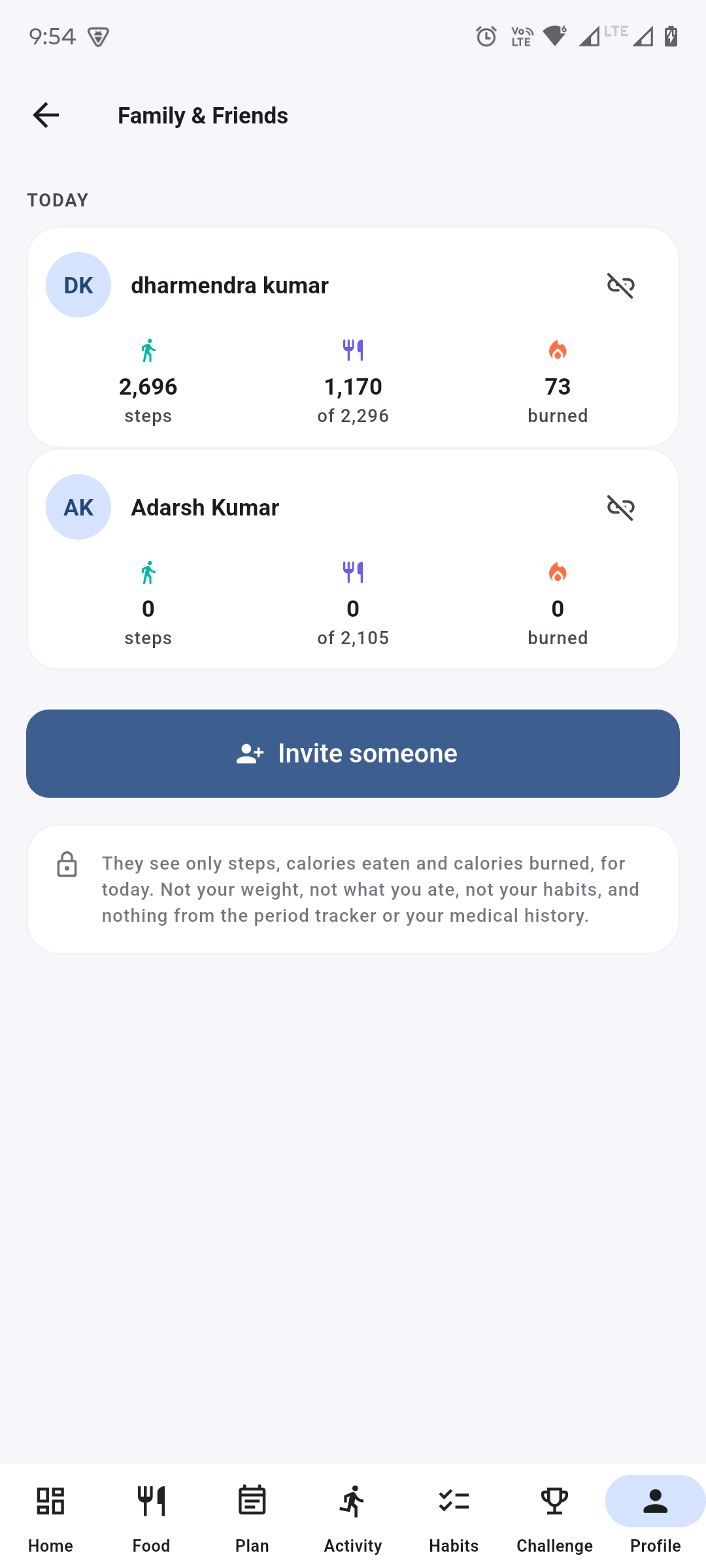
Invite somebody by the number they signed up with; once they accept, you each see the other’s steps, calories eaten and calories burned for the day. Nothing else — not your weight, not what you ate, not your habits, and nothing at all from the period tracker or your medical history.
Nothing is visible until they say yes — Every read filters on accepted specifically, so a bug that forgot the check would fail closed rather than hand out a stranger’s day.
Sharing is mutual, and the request says so — One-way visibility would make accepting an invitation an agreement to be watched by somebody you cannot see back.
Either side can end it, alone — Sharing you cannot leave on your own is not consent.
Your address book stays on your phone — Contacts are read and searched on the device. The only thing that leaves is the one number you tap.
Three figures each, and a note saying plainly what is not shared.
Medical history
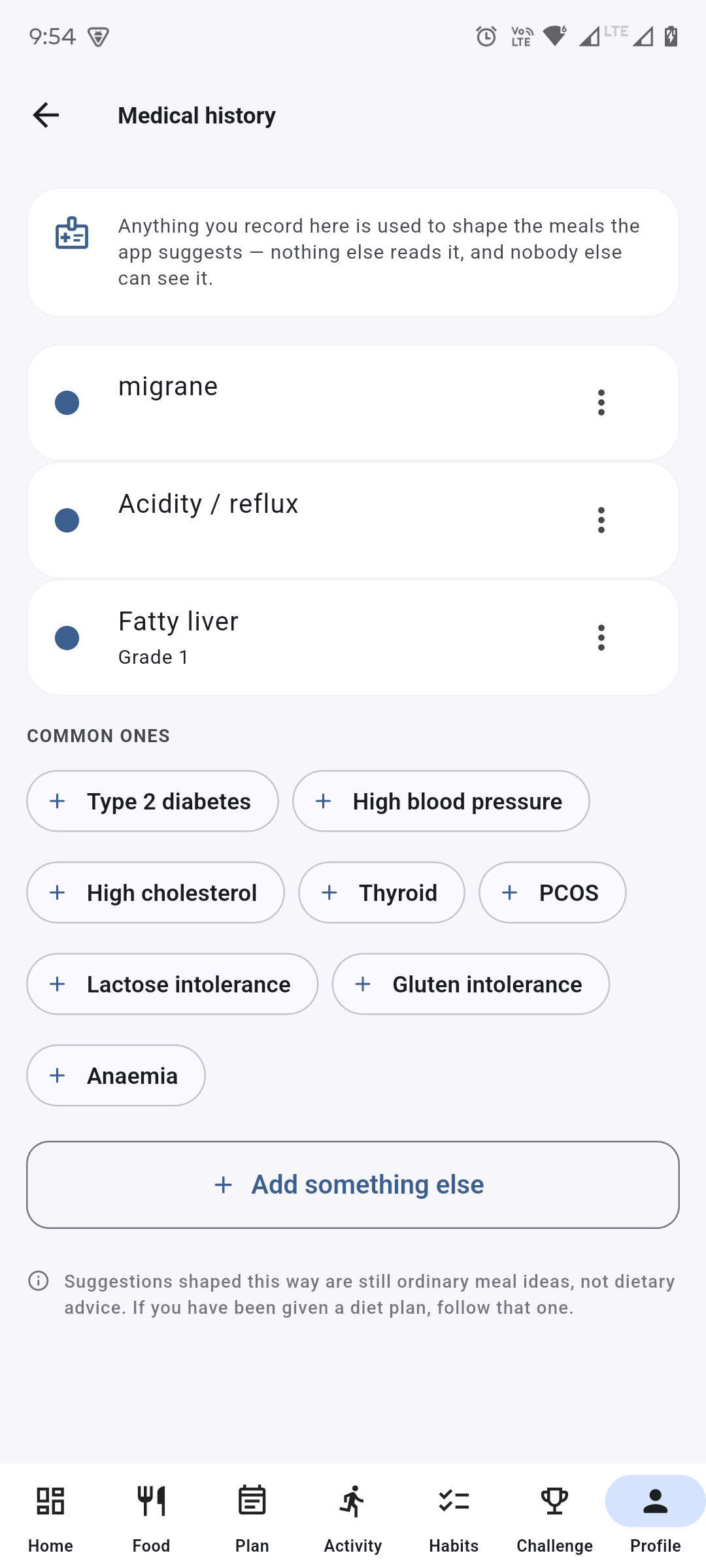
Record diabetes, blood pressure, an intolerance, in your own words. Meal suggestions that ignore a condition are worse than useless to the person who has it. Nothing else in the app reads this, and there is no admin view of it.
The prompt asks for suitable food and forbids the rest — It is told not to give advice, name medicines, mention dosages or comment on the condition.
Resolved, not deleted — Something that has cleared up stays as history and drops out of the prompts.
Still meal ideas, not a diet plan — Said on the screen: if a professional has given you one, follow that.
Free text, kept as typed, with the common ones a tap away.
Reminders
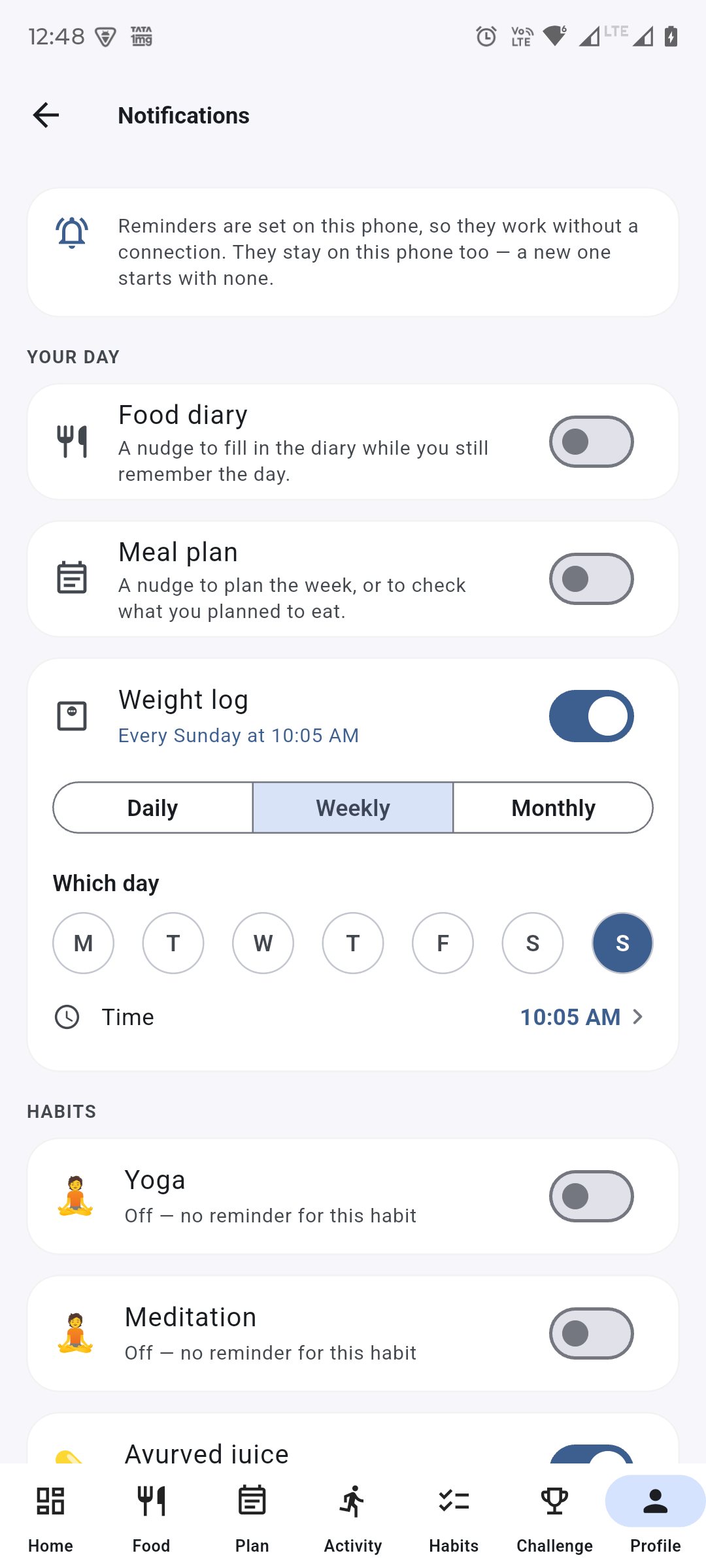
A switch each rather than one for the lot. “Remind me about my habits” is not a question anybody can answer yes to: drinking water and reading before bed are not the same request. Daily, weekly or monthly, at a time you pick — and hourly for the habits nobody does once.
Hourly, for the ones that repeat — Eight glasses of water nudged once at nine in the evening is a verdict, not a reminder.
The day belongs to you, not the server — Every boundary is computed in your own timezone, taken from the device and kept in step on every launch.
A switch each. The weight log opens its own day-and-time picker when it is on.
Period tracker
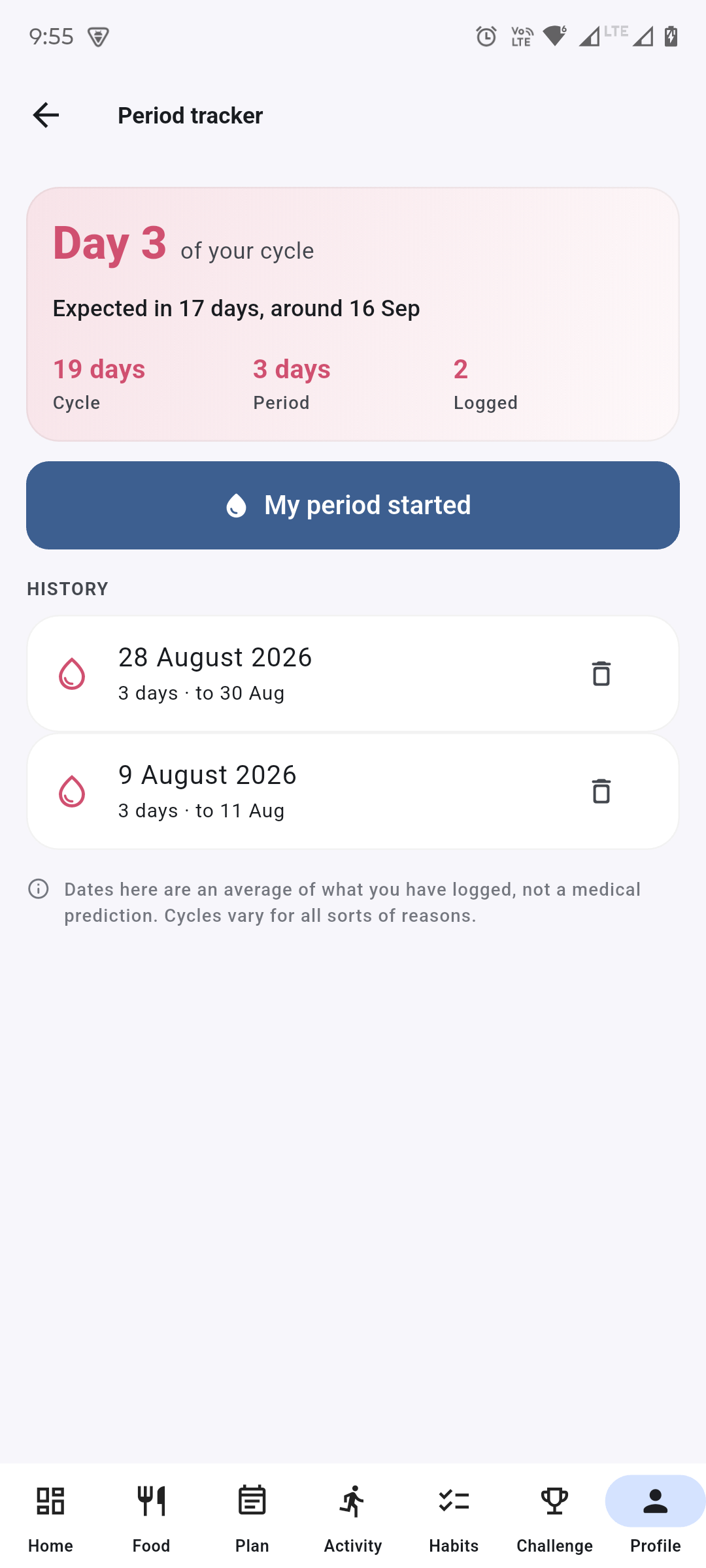
Log when a period starts, fill in when it finishes, and the screen works out how long your cycle runs and when the next one is likely. With one period recorded there is no prediction, and the screen says so — a textbook 28 days shown as though it were personal is worse than an honest “not yet”.
Impossible gaps are discarded, variation is not — Anything under 15 or over 60 days is dropped from the average. A genuinely irregular 45-day cycle still counts.
No fertility or ovulation predictions — Estimating those from calendar averages is unreliable enough that presenting it inside a habit tracker would be irresponsible.
Nothing here is reachable by anyone else — Every route is scoped to the caller’s own id. There is no endpoint that takes a user id — not even for an admin.
Every figure averaged from your own logs, and the screen says so.
Not built yet
An iPhone build — the project exists, only the Android app is released. Water intake as its own tracker rather than a habit. Sleep. Barcode scanning. And subscriptions, which is why the AI features are paid for with a daily free allowance and challenge credits instead.